

How it works
Devsy has a client and an agent. The client is the CLI or desktop app on your machine. When you create a workspace, the client installs its own agent on the host and inside the container, so you only ever install the client. The agent forwards ports, forwards credentials, and streams logs, and it runs an SSH server that your IDE connects to.
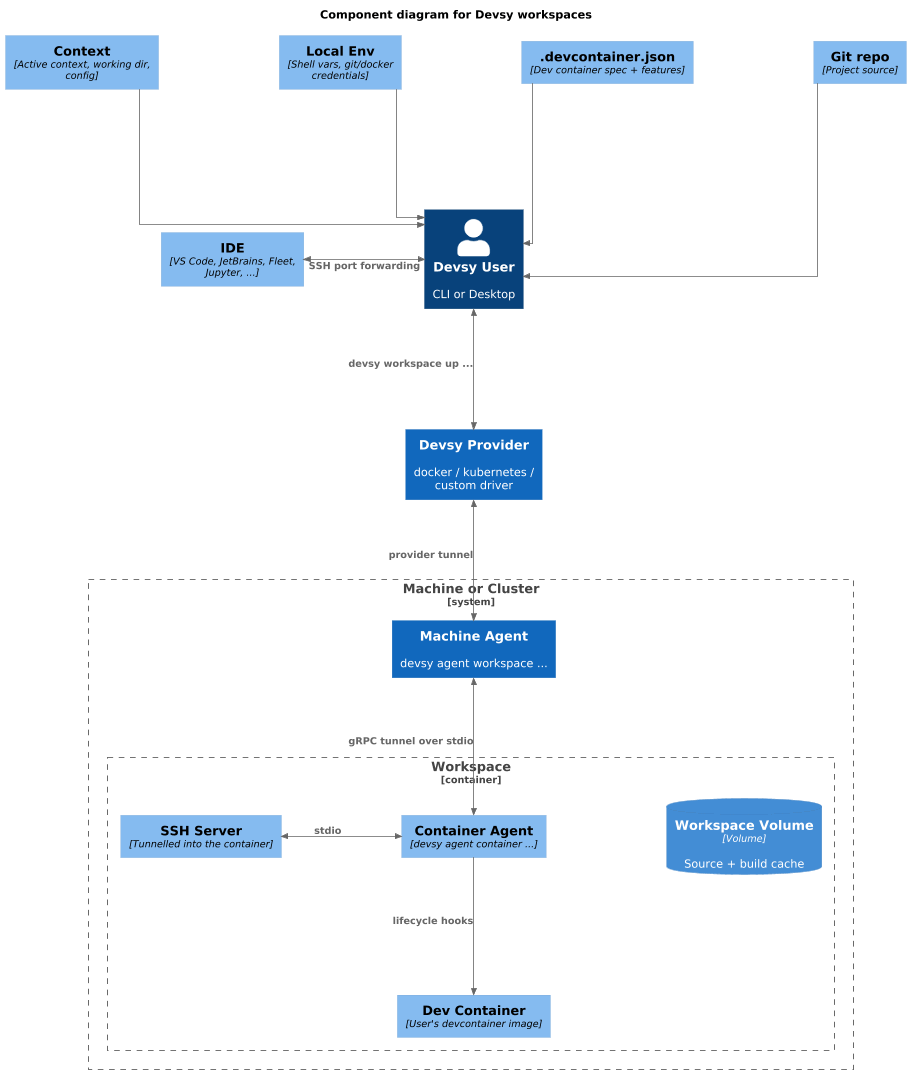
When you run devsy workspace up, Devsy picks a provider, starts the devcontainer, and deploys the agent into it. Machine providers create a VM first if needed. Providers wrap the tools you already use, such as docker or gcloud, or call an API directly, as the Kubernetes driver does.
The client reaches the agent through a tunnel, and the transport depends on the provider. AWS uses Instance Connect and Kubernetes uses pod exec. The agent runs an SSH server over the tunnel, and Devsy opens your IDE over that SSH connection. Port forwarding works only while an IDE or SSH session is open.
To skip the build, create a workspace from a saved snapshot with devsy workspace up --from-snapshot.
For what happens during up, see How Devsy deploys workspaces.